
IDENTITY AND ACCESS RISK PLATFORM
Understand identity and access risk in Microsoft Entra
TPZ brings supported Microsoft Entra identity and access context together so security teams can investigate conditions that need attention and understand the evidence behind them.
Today, TPZ is read-only. The Design Partner Beta is designed to progress toward customer-authorized action, read-back verification, retained evidence, and governed recovery.
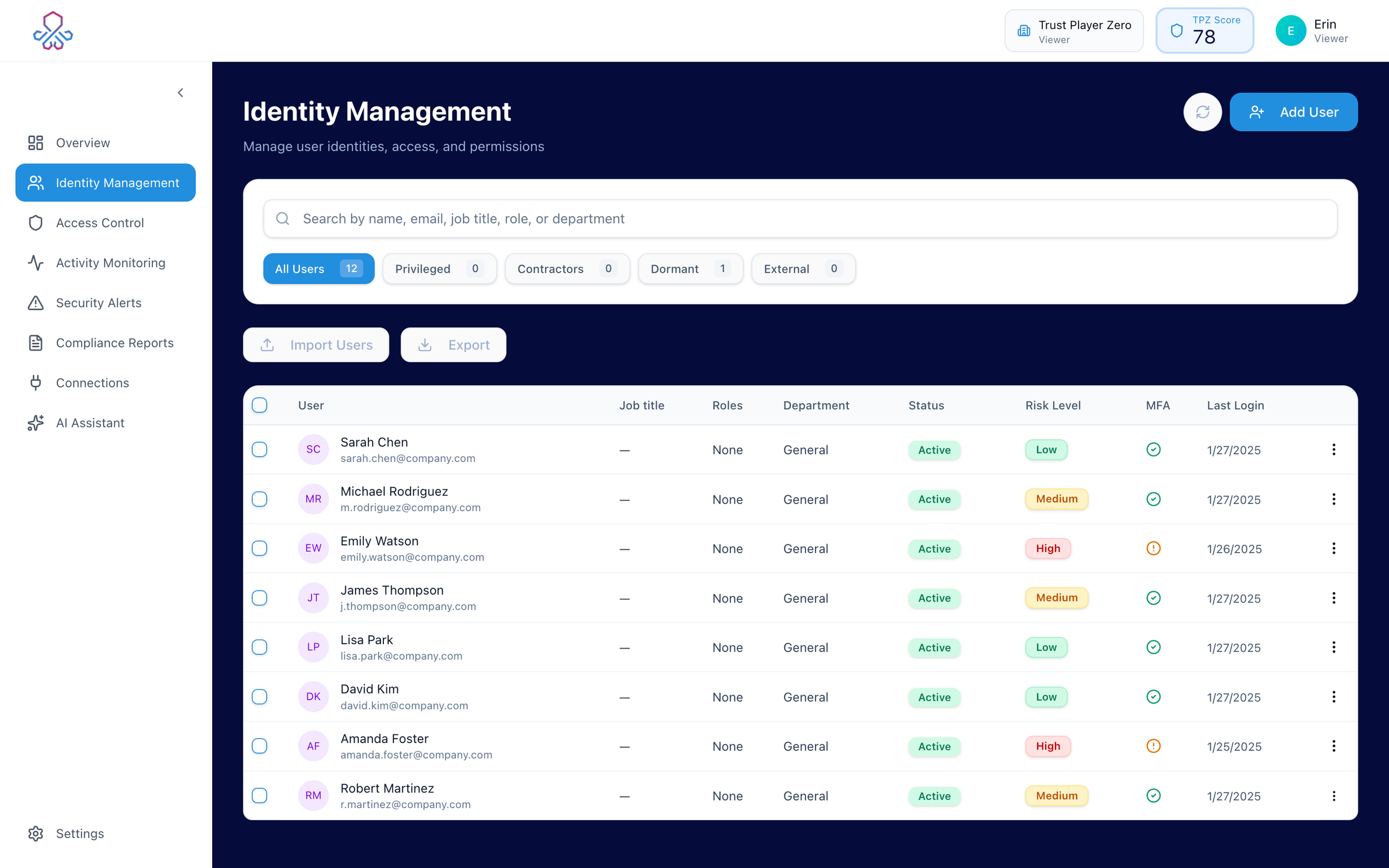
THE IDENTITY PROBLEM
IDENTITY RISK DOESN’T LIVE IN ONE PLACE.
Users, roles, MFA registration, sign-ins, access policies, and identity risk signals each tell part of the story. The harder part is that review and remediation often span native consoles, tickets, spreadsheets, and manual follow-up before a team can decide what deserves attention and confirm what changed.

Users
Who they are, where they’re from, and their account status.

Directory Roles
Assigned Microsoft Entra directory roles.

MFA Registration
Registered authentication methods and registration gaps.

Sign-ins
Recent activity, locations, devices, and anomalies.

Access Policies
Conditional Access policies configured in Entra.

Risk Signals
Identity Protection risk context and other supported security signals.
TPZ is designed to complement the systems teams already use by bringing more of that identity and access workflow together.
FROM SIGNALS TO INVESTIGATION
SEE WHAT NEEDS YOUR ATTENTION.
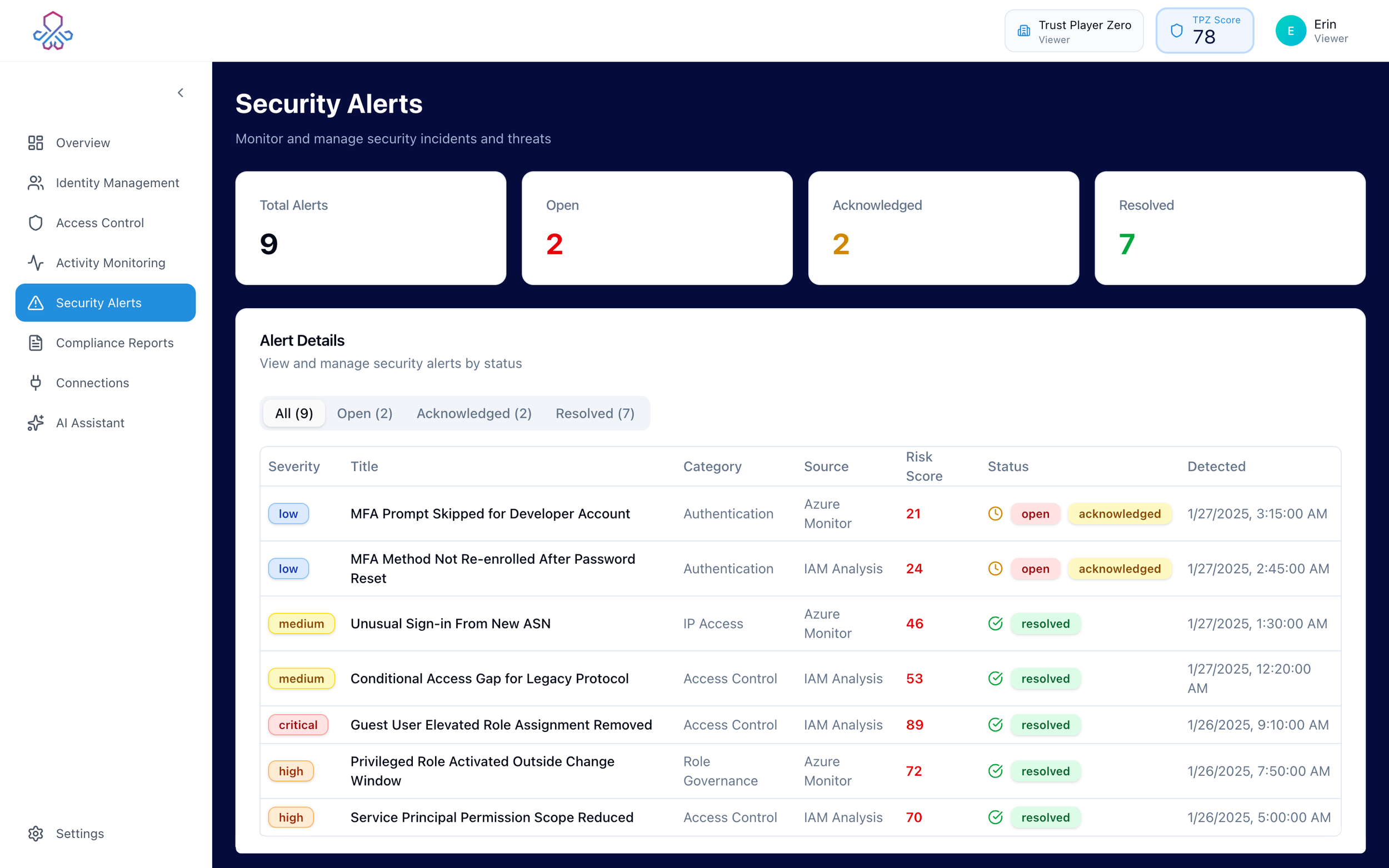
See risky users, unusual sign-ins, MFA registration gaps, and other supported signals that may need review.

Spot the issue
See risky users, unusual sign-ins, MFA gaps, and other signals that may need review.

Check the context
Look at the user, their access, recent activity, and related identity information in one place.

Understand why it matters
TPZ surfaces the signals behind the risk so your team can decide what deserves attention.
STANDARD TPZ IDENTITY & ACCESS AUDIT V1
START WITH A CLEAR VIEW OF WHAT DESERVES REVIEW.
The Design Partner Beta begins with a standardized Microsoft Entra identity and access audit using real customer data.
TPZ surfaces evidence-backed conditions for review so your team can understand what is happening before deciding whether anything should change.

DORMANT USERS
Accounts with extended periods of inactivity that may deserve review.

NEVER-SIGNED
IN USERS
Accounts with no observed sign-in activity in the available data.

PRIVILEGED USERS
Users with supported Microsoft Entra directory-role assignments.

PRIVILEGED USERS WITH MFA REGISTRATION GAPS
Privileged users without registered MFA methods
in the available Entra data.

STALE GUEST ACCOUNTS
Guest identities with
activity or age conditions that meet the audit’s defined review criteria.

IDENTITY RISK
SIGNALS
Supported Microsoft Identity Protection signals that may warrant investigation.

CURRENT
Read-only evidence, investigation, and supported identity and access context.

DESIGN PARTNER BETA
Move findings through review toward customer-authorized remediation, read-back verification, retained evidence, and governed recovery.
START WITH MICROSOFT ENTRA.
WHAT EXISTS TODAY
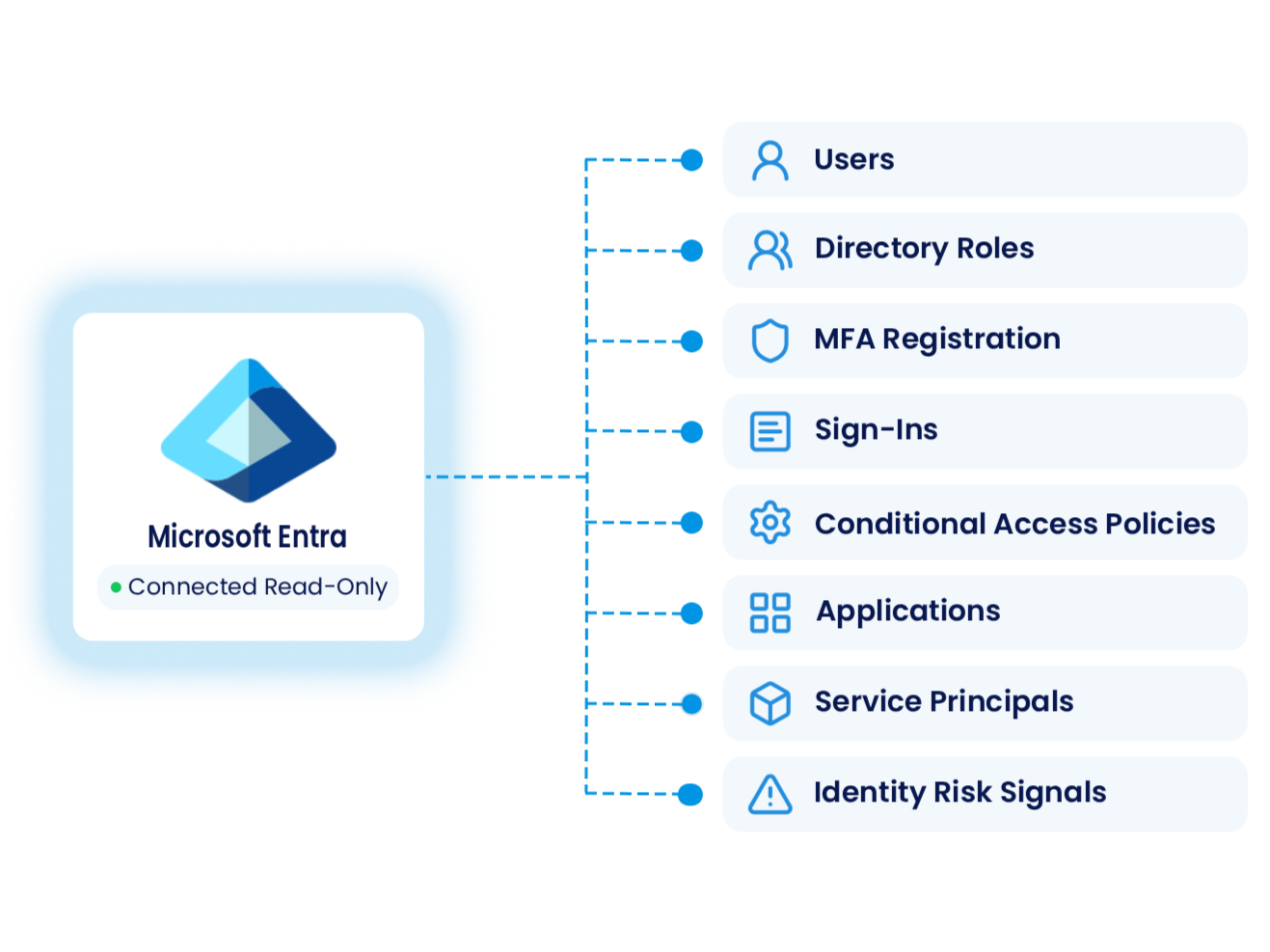
When configured for live Microsoft Entra access, TPZ reads supported identity and access context in read-only mode and brings it together for investigation.
You can review supported Microsoft Entra users, directory roles, MFA registration, sign-ins, Conditional Access policies, applications, service principals, and identity risk signals.
Coverage depends on configuration, permissions, licensing, and current product limits.DESIGN PARTNER BETA
FROM INVESTIGATION TO VERIFIED OUTCOME.
Today, TPZ is read-only. With Design Partners, we’re validating the next steps from review through customer-authorized action, read-back verification, retained evidence, and governed recovery.

FIND
See what needs attention.
Current


DECIDE
Review the evidence and determine the appropriate response.
Beta

FIX
Authorize and carry out the approved customer action.
Beta

VERIFY
Read the source system again, confirm the resulting state, and retain evidence.
Beta
You stay in control. Actions being validated in Beta require customer authorization.
DESIGN PARTNER BETA
HELP US PROVE THE NEXT STEP.
TPZ is working with a limited group of Design Partners to validate one customer-authorized Microsoft Entra workflow in real operating environments.

12 WEEKS
A focused Design Partner Beta with regular working sessions.

FREE TO PARTICIPATE
The program is designed around shared learning and validation.

ENTRA
A Microsoft Entra environment is required.

UP TO 5
A small cohort so we can work closely with each team.
WHAT WE’RE VALIDATING
The Beta target is to validate a customer-authorized Microsoft Entra disable action, read the resulting state back from Entra, retain evidence of what happened, support governed re-enable, and verify the restored state.




AUTHORIZE
DISABLE
READ BACK
RETAIN EVIDENCE
RECOVER

BUILT FOR THE PERSON ACCOUNTABLE FOR CYBERSECURITY IN A MICROSOFT-HEAVY ENVIRONMENT.
WHO IT’S FOR
TPZ is starting with Microsoft-heavy Financial Services and FinTech organizations where one person or a small team carries broad cybersecurity responsibility. The same people may be identifying identity and access risk, investigating what happened, coordinating decisions, and following through on what needs to change.

ACCOUNTABLE BUYER
Owns the security outcome and has authority over the relevant security or IT budget.

CHAMPION
Feels the identity and access pain directly and helps move the workflow forward inside the organization.

OPERATOR
Works hands-on with identity and access context and helps validate the workflow in practice.
One person may fill more than one of these roles.
UNDERSTAND WHAT TPZ CAN ACCESS.
SECURITY & DATA
TPZ connects to Microsoft Entra in read-only mode today. See how we handle permissions, data, access boundaries, and how those requirements change as the Design Partner Beta progresses.
FROM IDENTITY RISK TO A BROADER SECURITY CONTROL PLANE.
FUTURE DIRECTION
TPZ’s longer-term direction is a cross-system security control plane that coordinates evidence, decisions, customer-authorized actions, verification, and retained proof across the systems organizations already use.
Want to see where TPZ is headed next?
Future direction. Not current product capability.DESIGN PARTNER BETA
READY TO WORK THROUGH A REAL IDENTITY AND ACCESS PROBLEM WITH US?
We’re working with a limited group of Design Partners to validate the workflow in real Microsoft Entra environments.